



A safety procedure changes at three facilities. Before anyone writes the announcement, Internal Communications teams need to answer a basic question: who works at those sites, in which roles, and who manages them? For organizations running Workday as their core HR system, that answer already exists. Workday is where HR maintains the record of who works where, in which role and under which manager. Yet preparing the announcement can still mean requesting a file from HR, rebuilding distribution lists and asking site managers to fill the gaps.
As a Workday Innovation Partner, Semos Cloud connects Workday with employee communications, and our customers raise the same questions about this gap. Will the solution live inside Workday or become another app? Will IT need to supply lists of who sits in which team? How will we see who actually opened a message? Some came to us after a separate employee app had struggled to get employees to install it.
From channel-first to employee-centered
These questions share a root cause: employee communications is planned around channels. A channel-first approach starts with an announcement and somewhere to publish it, then builds the audience from email lists, Teams groups or intranet access. The gaps appear when roles change faster than lists are updated, when frontline employees rarely open a corporate inbox, and when a new app depends on people choosing to download it. Each channel reports its own activity, yet nobody can confirm if the people affected received the message.
An employee-centered approach starts with those people: who they are, what they need to know and how they can access information during their working day.
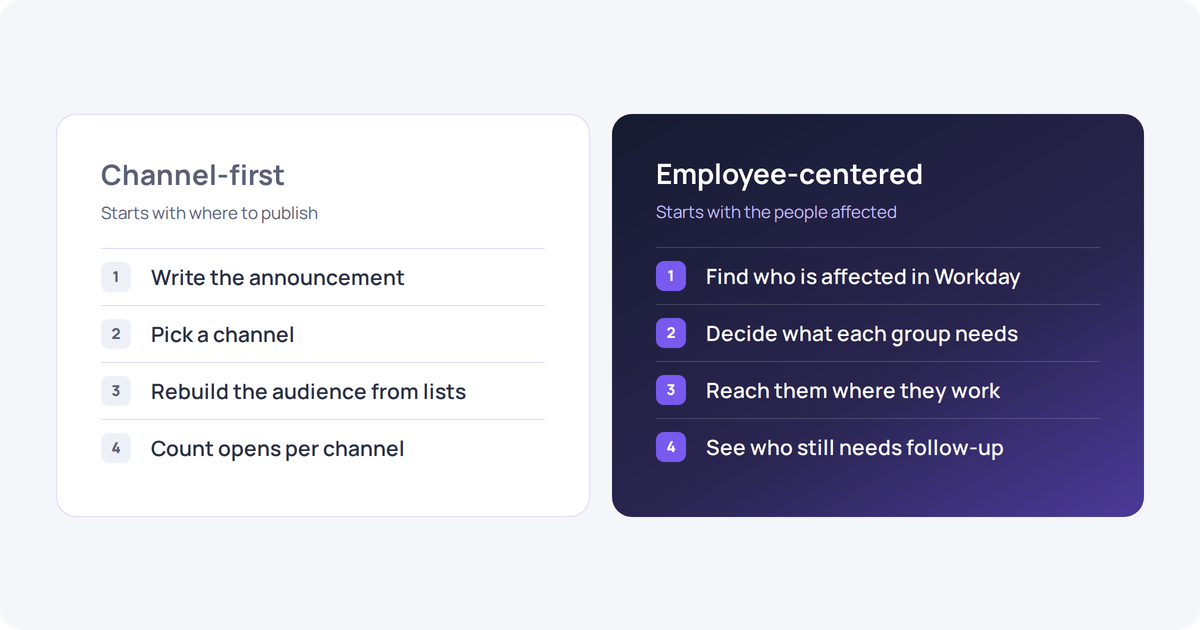
For organizations using Workday, the HR system already holds much of what this approach needs: who employees are, where they work and who manages them. Five principles guide it:
- Connect communication to trusted employee data.
- Target the people affected.
- Choose channels around the audience.
- Include frontline and deskless employees from the start.
- Measure reach against the intended audience.
Put the employee information you already maintain to work
Your Workday environment already knows who changed sites last week, who reports to which manager and which teams work on the shop floor. The question is how much of that makes it into your next announcement. The principles below show how to bring it in, and each ends with a question to test where your team stands today.
1. Connect communication to trusted employee data
Audience planning starts with the employee information your company already maintains. In Workday, that means using available role, location and department data to identify the people affected by an announcement.
That connection also needs to account for change. When someone moves location or role, the messages relevant to them change too, so HRIS and Internal Communications teams should agree which data informs audiences.
Ask yourself: When an employee changes location, how long before your communication audiences reflect it?
2. Target the people affected
An accurate audience helps teams decide what each group needs to know. A benefits announcement may apply to one country. A process change may affect one department, while managers need guidance to explain it.
Our Employee Communications solution reads relevant employee data from Workday to support audience targeting. Teams can then build campaigns around those groups without recreating lists for each message.
It also answers a fair HRIS concern: “We do not want another employee database to maintain.” Workday remains the foundation for employee information.
Ask yourself: Did each group affected by your last major announcement receive the information that applied to them?
3. Choose channels around the audience
Delivery should follow how those employees work and the nature of the message. An urgent operational update and a benefits reminder may need different channels, and email, Teams and SharePoint still have a place.
Employee Communications supports delivery through email, SMS and mobile channels, so each group can be reached where it actually works.
Workday can also be one of those channels. Our Celebrate & Connect app shows employees the latest company updates in its Connect tile inside Workday and sends a Workday notification when a new communication is shared.
Ask yourself: Which channels does each employee group check during the working day?
[cta]
4. Include frontline and deskless employees from the start
A retail associate, clinician or field technician may have little opportunity to check a corporate inbox during the working day, if they have one at all. In manufacturing, retail, healthcare and logistics, these conditions are central to effective frontline employee communication.
The 2026 IC Index surveyed 5,000 UK employees in organizations with at least 500 employees. Most said they had 10 minutes or less a day to engage with communication.
Including frontline employees from the start means planning for them when the audience is defined. Identify which groups work away from a computer, and choose channels they can use on the job, such as SMS, a mobile app or Workday itself.
Keep the message short enough to read during a break, and give shift supervisors a summary they can share at the start of a shift.
Ask yourself: How did your frontline teams receive your last company-wide update, and how long after everyone else?
5. Measure reach against the intended audience
After sending, Internal Communications teams need to know whether the employees affected received the message, how they engaged and where follow-up is needed.
Employee Communications tracks this in a single dashboard: who received each message, who engaged and which channels performed. Those signals also shape the next step.
Our Communication Agent helps teams create targeted messages based on audience and engagement signals, so a follow-up goes to the people who still need it.
An open or click still says little about understanding, so important instructions may also need a manager conversation.
Ask yourself: After an important update, can you tell which affected employees have not received it?
Reach that keeps up with your workforce
For organizations using Workday, these principles close the gaps where employee context gets lost, and that has a direct business impact.
Critical updates, from safety procedures to policy changes, reach the people affected before the change takes effect. Frontline employees get the same access to information as colleagues at a desk. HR and IT keep Workday as the single employee record, and Internal Communications teams stop rebuilding lists before every send.
Curious how this would work with your own Workday data? Request a demo, and we'll show you what it could look like for your teams.


Ready to unify your people programs?
Stop running recognition, rewards, communications, and development in silos. See how Semos Cloud brings it all together in one AI-powered platform, built for enterprise, certified for compliance, and proven at scale.