 Product Innovation
Semos Cloud Q3 2026 Product Innovation: New capabilities for a culture that crosses countries, teams and company lines
Semos Cloud Q3 2026 Product Innovation: New capabilities for a culture that crosses countries, teams and company lines


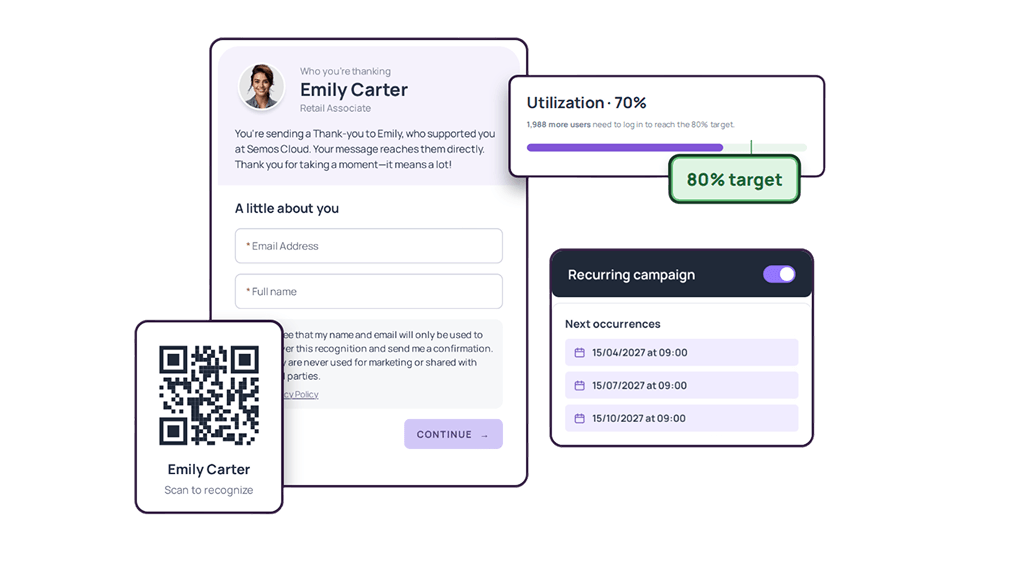


This quarter, we’re bringing customers and partners into recognition and giving HR more ways to support the people behind every program.
What we delivered
- External recognition brings customers and partners into the recognition experience.
- Personalized experiences adapt welcomes, celebrations and survey questions to employees.
- Approval delegation and recurring campaigns keep recognition and communications moving.
- Utilization insights and clearer benefits information help HR track participation and employees understand their rewards.
Global enterprises run on many structures at once: dozens of countries, business units, HR systems, programs and approval chains. Semos Cloud's People and Culture Intelligence platform was built to work across all of them. Today it serves more than 2 million users in more than 25 industries. It has native integrations with SAP SuccessFactors, Workday and Oracle HCM.
Working at that scale shows us how much flexibility those structures need. A recognition program covers the people on the payroll, yet customers and suppliers often shape an employee's best work. Programs follow eligibility rules, reporting lines and country setups, yet senders rarely know the rules, teams change managers in the middle of a quarter, and a welcome that works at headquarters may not work in another country.
Flexibility has always been part of how we build, and our customers helped shape where we took it this quarter. Our release for the third quarter of 2026 helps people programs cross countries, teams and company lines.
External recognition: Appreciation from your customers, recognition for your partners
An employee’s contribution often reaches people their manager never meets. In healthcare, a patient’s family sees the care someone puts into their recovery. In hospitality or food service, a guest notices the extra effort that makes them feel welcome. In retail, a customer remembers the employee who took the time to solve their problem. Giving those people a way to recognize employees brings their perspective into the recognition program and helps employees see how their work matters beyond their own team.
With external recognition, people outside the company can now recognize your employees, and your employees can recognize them. Every eligible employee gets a personal QR code they can share or download from their profile. A customer or partner scans it, chooses a program, writes a message and submits it, with no account or sign-in. The recognition appears in the employee’s awards.
A customer’s thank-you gives employees a direct connection between their effort and someone else’s experience. Capturing it alongside recognition from colleagues helps reinforce the service your company wants to encourage.
It works in the other direction too. Employees can recognize suppliers, contractors and partners by name and email through dedicated external programs. The recipient gets the recognition by email, with nothing to sign up for. When a supplier’s technician works through the night to fix a problem, the employee who relied on them can say so properly. Those relationships keep operations running, and recognizing the people behind them shows that their contribution matters to your team.
Flexible recognition flow: Start with the person
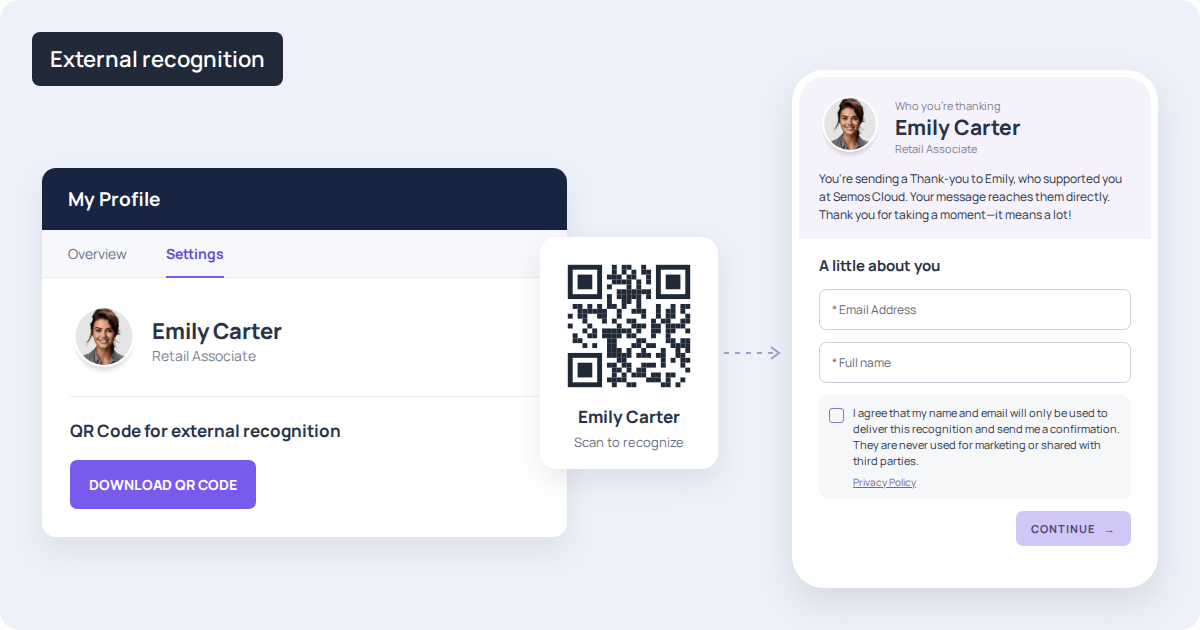
The flexible recognition flow lets senders choose one or more recipients first. The platform then shows only the programs those recipients are eligible for.
People know who they want to recognize. They shouldn’t have to understand the company’s program rules to do it. Starting with the person removes the search for an eligible program, making recognition easier to complete while keeping the company’s eligibility rules in place.
One customer, for example, assigns recognition programs by pay grade. Senders don’t know a colleague’s pay grade, and they shouldn’t need to. They can now select their colleague and see the relevant programs, without having to search through each one or know the criteria behind it.
Nomination questions: Every contribution judged on the same evidence
Nomination programs often include the company’s most high-profile awards. Choosing the winners calls for a clear, consistent basis for comparison. Yet one nomination might explain the results while another only says someone did a great job.
Admins can now add written, single-choice or multiple-choice questions to nomination programs. The questions lock once the first nomination comes in, so every entry answers the same questions. This helps nominators include the details that matter and gives reviewers a more consistent basis for comparing contributions.
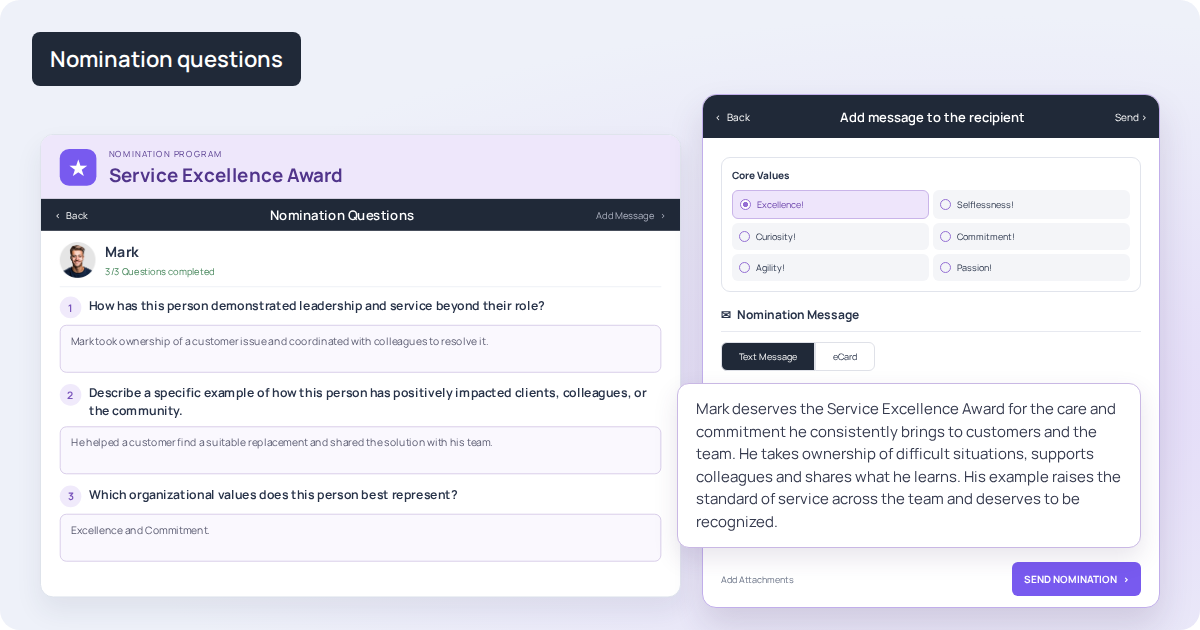
For an innovation award, for example, a program can ask every nominator about the problem the nominee spotted, the action they took and the result. Those answers stay with the nomination through review, helping the panel understand what each person achieved.
Non-monetary new hire welcome: A first day that fits where you join
Admins can now set what new hires receive by country, company code or organizational unit: points, a swag item, a personal welcome message or a supported combination. The welcome message appears in the app and in the welcome email.
A new hire's first day shapes how they see the company for a long time after. Many organizations already struggle here. According to Gallup, only 12% of employees strongly agree that their organization does a great job onboarding new employees. In a global company, the gap often follows geography. The welcome that works at headquarters can't always reach other countries, and some new hires start with no welcome at all.
Take a company hiring into a country where shipping swag isn't practical. It can now give new hires there a personal message on their first day, while colleagues elsewhere keep receiving points or a gift. Every new hire is welcomed from day one, wherever they join.
Celebration preferences: Each person decides what to share
Employees can now choose, one moment at a time, which peer celebrations they take part in. They can also opt out of all of them, including celebration types added later.
Celebrations only feel good when they're welcome. Until now, an employee who wanted to keep one moment private had to opt out of everything. Letting people choose keeps them part of the celebrations they enjoy and shows that the company respects where they draw the line.
Someone may be happy to celebrate a work anniversary with the whole team and still prefer to keep their birthday private. Now they can do both.
Conditional survey flows: Questions that follow the answer
People are more likely to engage with a survey when the questions are relevant to their experience. Asking questions that don’t apply to them wastes their time and can lead to survey fatigue, making them less willing to participate in future surveys. By showing each person only the questions that matter to them, organizations can make surveys shorter for employees and the results more useful for HR.
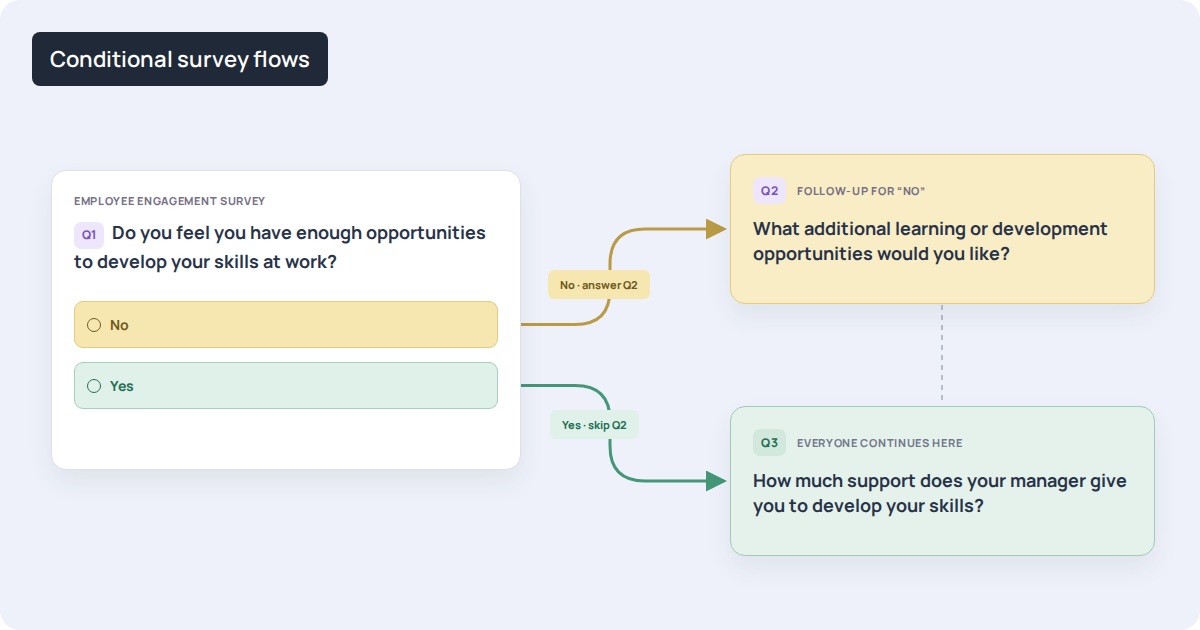
Surveys can now follow different paths depending on how people answer. Admins add logic to single-choice and opinion-scale questions to continue, skip ahead or end the survey.
An onboarding survey might ask whether a new hire received all their equipment. A Yes moves them on to the next topic, and a No opens follow-up questions about what’s missing, so HR knows exactly what to fix.
Automated approval delegation: Keep recognition moving when approvers are unavailable
In a large enterprise, recognition can depend on approvals across many teams and business units. When an approver is unavailable, keeping requests moving can mean chasing them for a response or manually reassigning approvals to someone else. That adds work for administrators and leaves employees waiting for recognition.
With automated approval delegation, approvers can assign someone to handle recognition requests on their behalf. Both pending and incoming requests are automatically routed to the delegate, along with the related emails and notifications. Teams no longer need to arrange cover for each request individually, and the original approver keeps their role.
At the scale of an organization recognizing more than 200,000 professionals, that manual coordination can quickly multiply. Setting up delegation once reduces repeated follow-up and helps recognition reach employees while their contribution is still fresh.
Platform utilization overview: See how far your programs reach
Knowing who opened the platform tells HR very little about whether a program is working. Seeing who takes part, and where participation drops, gives HR something to act on during the year, while there’s still time to change the result. It also helps HR show leadership where the investment is landing. With global employee engagement at 20% in 2025, its lowest level since 2020 (Gallup, State of the Global Workplace 2026), spotting early signs that people programs aren’t reaching parts of the workforce matters.
The new utilization overview shows active users, logged-in users, engagement and utilization, with utilization tracked against a target HR sets. A Needs Attention panel flags the organizational units and countries falling furthest behind.
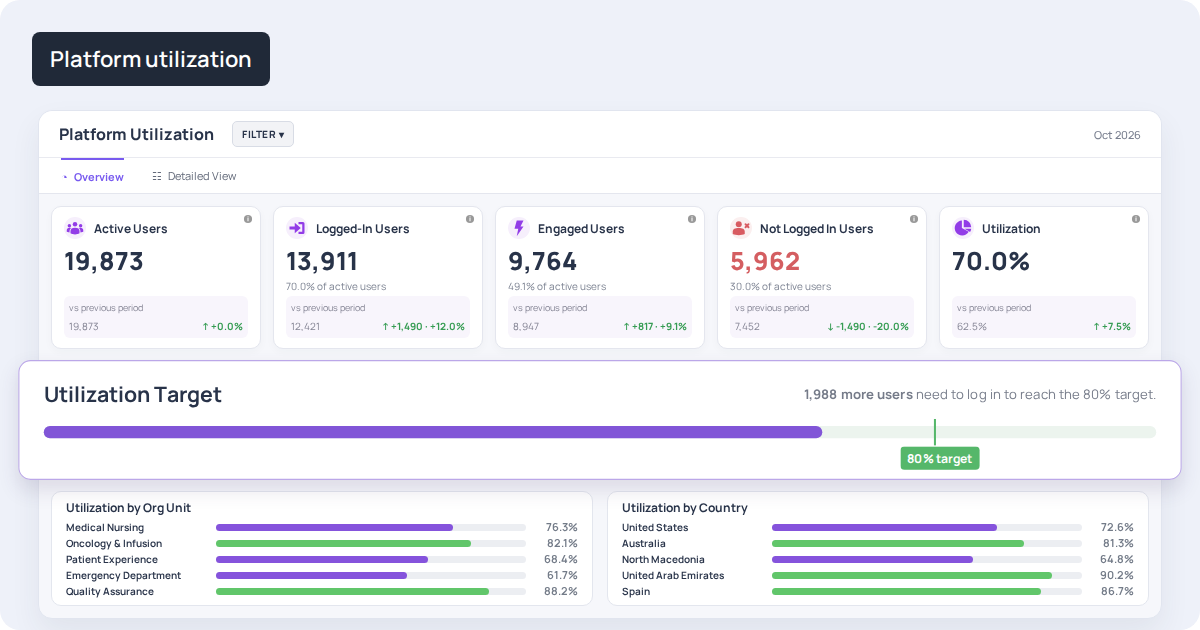
An HR team might set a participation target for the year and see in the first quarter that two countries are behind. That gives them a reason to speak with local leaders, understand what’s holding participation back and decide where support is needed. They can then track whether those efforts bring more people into the program, giving leadership a clearer picture of both the gap and the progress made.
Recurring communication campaigns: Communications that keep their rhythm
Regular employee communications shouldn’t require the same scheduling work every time. Recreating a recurring campaign by hand takes time away from planning and content, and creates another opportunity for a routine message to be missed.
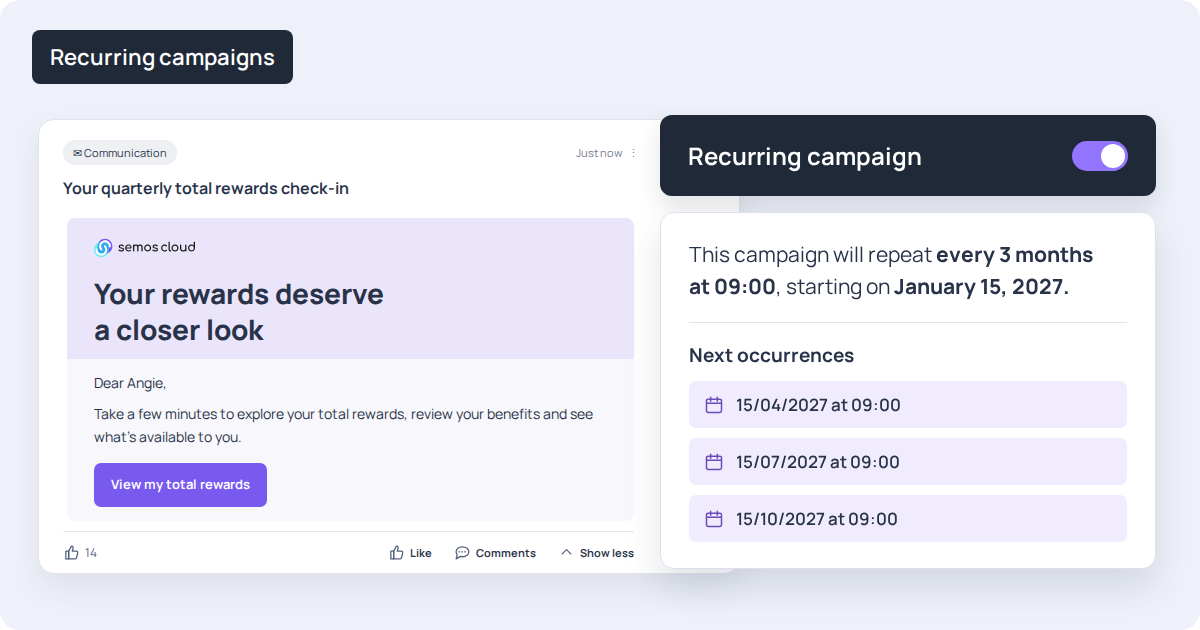
With recurring communication campaigns, admins set up a campaign once and choose how often it repeats: daily, weekly, monthly or yearly. They can preview upcoming sends and pause, resume or end the campaign as needed.
For example, a monthly reminder about available employee resources can follow a recurring schedule. The team spends less time managing repeat sends, while employees continue receiving information they can use.
Multi-source benefits: A complete view of each benefit
One benefit can be recorded as several separate amounts. For example, a company might record two components of a benefit in different payroll fields. Employees need to see the total value of that benefit without having to work out how those figures fit together.
In Total Rewards Hub, HR can now combine those amounts into one benefit value per employee. HR can also use payment records to show each benefit to the employees who actually received it, without maintaining a separate list of eligible employees.
This helps HR present a rewards package that reflects what each person actually receives. That clarity matters: in a 2021 Voya survey, 35% of employed respondents said they didn’t fully understand any of the benefits they had enrolled in.
Page-specific disclaimers: Require acknowledgment before access
Compensation and benefits information can come with conditions employees need to understand and accept. HR and legal teams need a way to present those terms before employees view the information, especially when the terms change.
In Total Rewards Hub, HR can now attach a disclaimer directly to the Compensation or Benefits page. The page’s content stays hidden until the employee accepts, making acknowledgment a required step before access.
For example, if the conditions accompanying compensation information change midyear, HR can require employees to accept the updated terms when they next open that page. Combined with an annual acknowledgment, this helps HR keep acceptance aligned with the current terms.
Common questions about this release
1. Do customers and partners need an account to send or receive recognition?
No. External senders scan the employee's QR code and submit their message directly. External recipients get the recognition by email, with nothing to sign up for.
2. Is external recognition monetary?
No. It is always non-monetary and runs through dedicated external programs.
3. Can we keep the current way of choosing a program first?
Yes. The flexible recognition flow is optional, and organizations that don't enable it keep the existing flow.
[cta]

Ready to unify your people programs?
Stop running recognition, rewards, communications, and development in silos. See how Semos Cloud brings it all together in one AI-powered platform, built for enterprise, certified for compliance, and proven at scale.