


.png)
- An approved budget amount is only the starting point. How you split and govern it decides whether managers actually use it.
- Separate two choices: where the budget sits (a shared pool, employee budgets or manager budgets) and when it's deducted (the moment an award is sent, or once it's approved). They can be combined.
- Size manager budgets to the team, for example by calculating them from each manager's direct reports.
- Agree on the basic rules up front, including how often the budget refills and what happens when it runs out.
- Match approval steps to the value of the award, not to the seniority of the person giving it.
Introduction
ou have a number. Maybe Finance has approved it, maybe you're about to present it. Either way, your employee recognition budget isn't finished once the overall amount is agreed.
That amount tells you how much you can spend. It doesn't tell a manager whether they can send an award right now, where the money comes from, or what happens if their team runs out halfway through the year. Those answers come from how the budget is set up, and that setup is what decides whether recognition actually happens.
This guide walks through the decisions that turn an approved budget into a recognition program people can use.
A total is not a budget
Think about what a manager needs to know before giving an award:
- Do I have a budget, or does this come from somewhere else?
- Can I send it immediately, or does someone need to approve it?
- How much is left, and when does it refill?
If the answer to any of these is "I'm not sure," recognition slows down. Managers hold back, wait for permission, or skip it entirely. A clear structure removes that hesitation and makes recognition feel fair, because everyone works within the same rules.
Step 1: Decide where the budget sits and when it's deducted
A recognition budget is defined by two separate choices: where the budget sits and when it is deducted. Where it sits can be a shared pool held centrally, an individual employee budget, or a manager budget. When it is deducted is either on recognize, the moment an award is sent, or on approval, once the award has been approved. The two choices can be combined. A shared pool, for example, can be drawn down as soon as an award is sent, or only after an approver signs off, depending on whether an approval step is set up.
Where the budget sits: Shared pool. A budget held centrally and drawn down by a defined group of people. It can be one global pool or split by organizational unit, division or country. This works well when Finance wants one number to sign off, or when local tax and cost-of-living differences make country-level pools the fairer option.
- Employee budget. Each employee holds points to send and can see their balance when recognizing a colleague.
- Manager budget. Each manager holds a budget for recognizing their team, set as a fixed amount or calculated from their number of direct reports.
When it's deducted: On recognize. Points leave the budget the moment an award is sent. This keeps recognition fast and in the flow of work.
On approval. The award is shown during the approval flow and deducted from the approver's budget once it clears. This adds control for higher-value awards without slowing down everyday recognition.
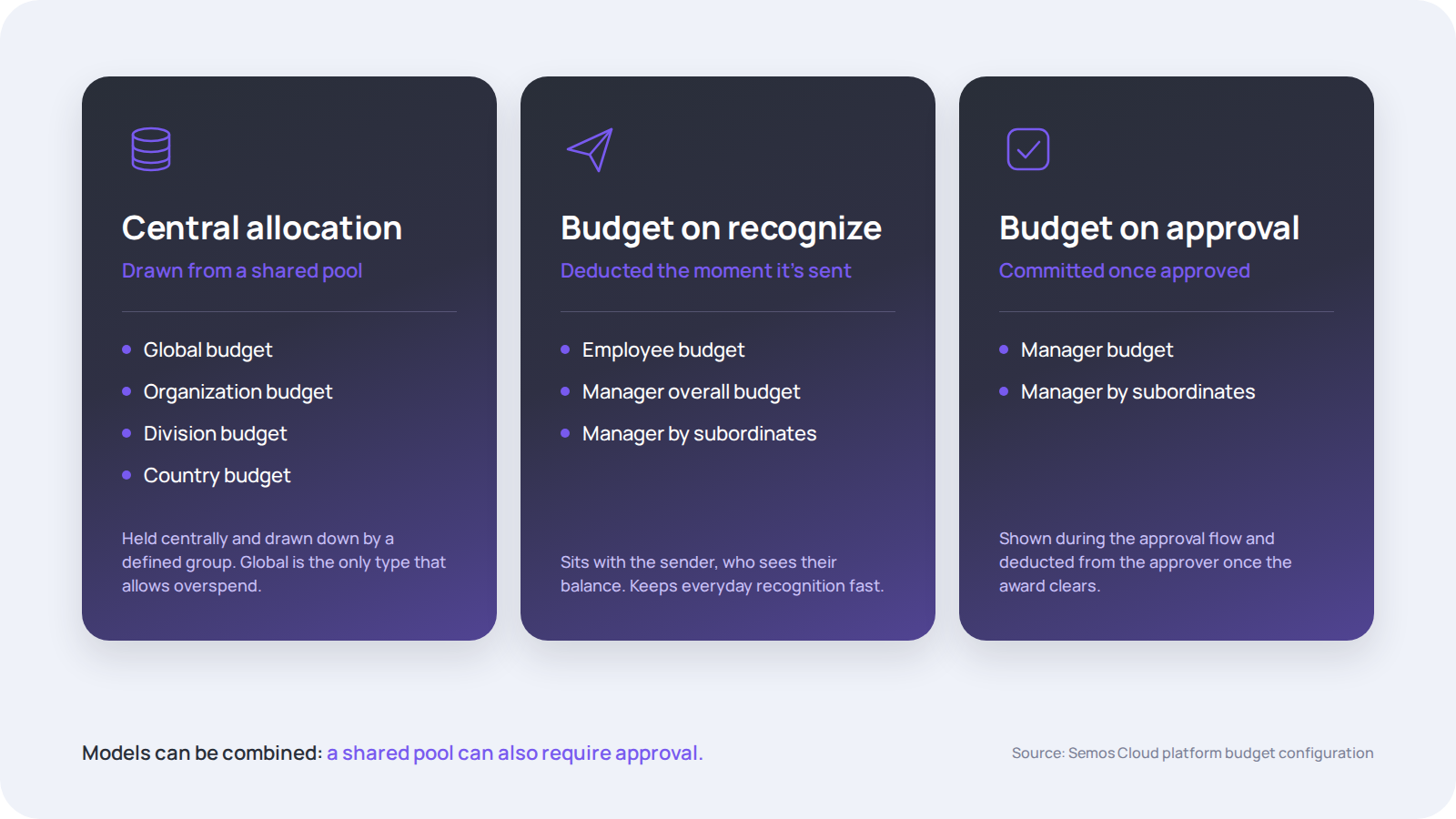
Most mature programs use more than one. A common setup is budget on recognize for everyday peer and manager awards, and budget on approval or a central pool for nominations and larger awards.
Step 2: Next, get specific about who holds the budget.
Once you know when money leaves the budget, decide where it sits. You can attach a budget to the whole company, an organizational unit, a division, a country, an individual employee or a manager. If part of your workforce is deskless, give field and frontline employees the same access as office teams; here's why recognition works as operational infrastructure for deskless workforces.
For manager budgets, there are two useful options:
- A fixed amount per manager, which is simple but can be unfair across teams of different sizes.
- An amount calculated from direct reports, where you set a per-employee figure and the system works out each manager's budget automatically.
You'll also need to decide scope: does the budget cover only a manager's direct reports, or every layer of their reporting tree?
[cta}
Step 3: Set the six controls
Every budget can be described with the same six settings. Agreeing on these up front saves a lot of rework later:
- Type: which funding family the budget belongs to.
- Aligned to: what the budget is attached to, from the whole company down to an individual.
- Approval: whether awards face additional approval steps, and how many.
- Overspend: whether awards can still be sent or approved once the limit is reached.
- Cumulative calculation: how often the budget refills, monthly or quarterly.
- Notifications: reminders before a period ends or once a share of the budget is used.
Overspend deserves special attention. In most setups, the budget stops at its limit. Allowing overspend on a global shared pool, the only budget type that supports it, can keep pending awards moving at the end of a period, but it should be a deliberate choice, not a default.
Step 4: Match approval depth to award value
Approval rules are where many programs lose momentum. Too many steps, and managers stop recognizing. Too few, and high-value awards start to feel arbitrary.
The principle is simple: governance depth should track award value.
- Everyday awards move with no approval. The budget deducts on send.
- Spot awards with real monetary weight get one or two approval levels.
- Nomination and milestone awards follow a formal review path with senior sign-off.
- Project and business-outcome awards go to executive approval and are often routed through payroll for tax compliance. If Finance, Tax or Security also need to approve the platform itself, see how HR leaders navigate internal compliance when buying a recognition platform.
Match the mechanic to the award value, not to the seniority of the person giving it. A senior leader sending an everyday thank-you shouldn't need an approval step, and a large award shouldn't skip one because the sender is senior.
Step 5: Learn from how enterprises scale
One pattern shows up again and again in enterprise configurations: the larger the workforce, the more the budget limit moves from the individual to the manager or a shared pool.
Smaller organizations often give every employee their own allowance. Larger ones tend to give managers a pool scaled to team size, or run a single shared budget with clear rules. Scale is governed through structure, not by lowering award values.
The right platform makes structure easier to keep. When budgets, approvals and payouts connect to your HCM, Finance gets one view of spend instead of reconciling scattered programs. SAP runs one recognition and rewards experience for more than 100,000 employees in over 170 countries with Semos Cloud, proof that a single structure can work at that scale. See more examples in our customers hub.
A one-page checklist to take to Finance
☐ For each program: where the budget sits and when it's deducted
☐ Budget owner defined: company, unit, country, manager or employee
☐ Manager budgets set as fixed or calculated from direct reports
☐ Approval levels set by award value
☐ Overspend rule agreed
☐ Refill period and reminder notifications defined
☐ Reporting cadence agreed with Finance
If you’re choosing a platform to support these requirements, explore our Recognition & Rewards RFP consultation and template.
Build the structure before the first award
Getting these decisions right before launch is far easier than fixing them once managers are already using the program. Our Recognition Budget Sampler covers each funding model, every budget type and real enterprise configurations, so you can see how each approach works in practice.


Explore related articles
.avif)
.avif)
Ready to unify your people programs?
Stop running recognition, rewards, communications, and development in silos. See how Semos Cloud brings it all together in one AI-powered platform, built for enterprise, certified for compliance, and proven at scale.